
Download Debenu PDF Tools – PDF Editing, Metadata Management, Secure Document Handling
Overview
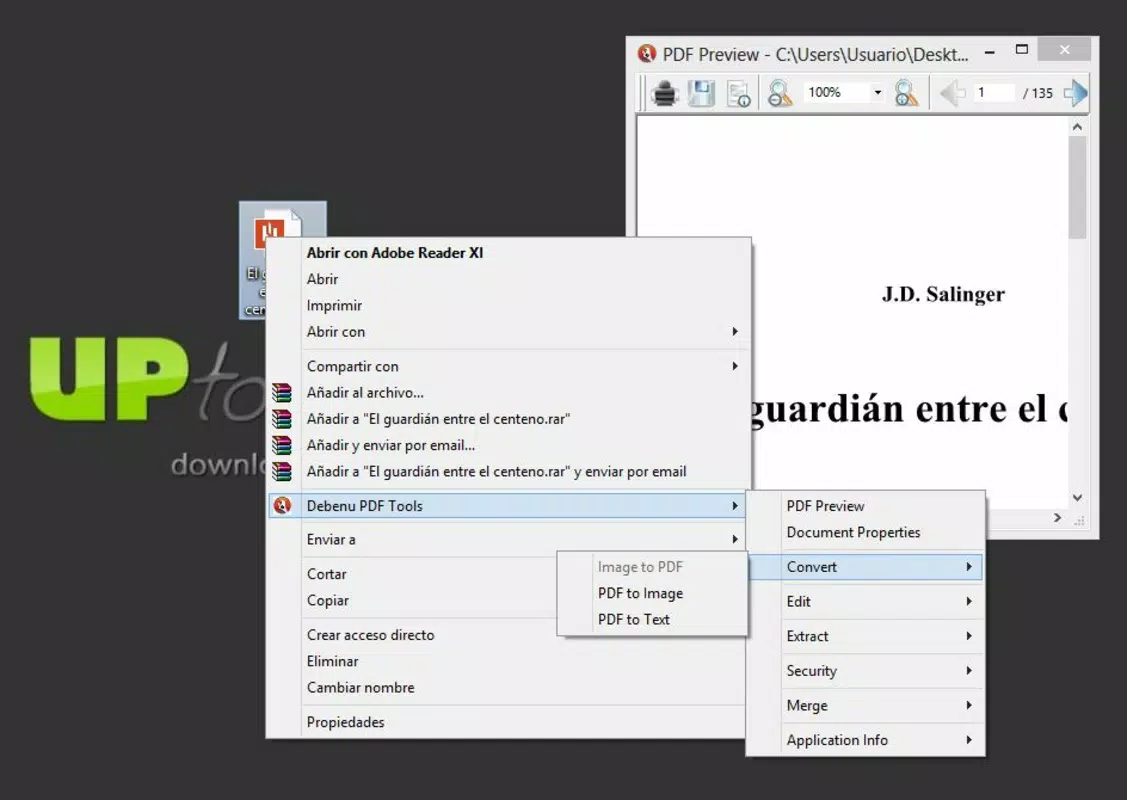
Debenu PDF Tools is a specialized mobile application crafted to support users in creating, modifying, and managing PDF documents with ease. Designed with efficiency in mind, the app integrates directly into the file shortcut menu, enabling quick access to essential tools through a simple right-click action. This functionality streamlines common workflows, particularly for individuals who frequently handle PDFs across personal and professional contexts. The app addresses the common challenges of document organization, file security, and format conversion, offering a unified solution for users who need reliable, on-the-go PDF management.
Target users include professionals, students, freelancers, and anyone who regularly interacts with PDFs. Whether consolidating reports, securing sensitive files, or converting image-based documents into editable formats, Debenu PDF Tools aims to simplify these tasks without requiring advanced technical knowledge. The app’s purpose is to enhance productivity by minimizing the steps needed to perform critical PDF operations. While the developer did not provide additional background information, the app has been available since 2014, indicating a long-standing presence in the mobile document management space. Its continued relevance suggests a stable and functional design tailored to real-world user needs.
Within the broader app ecosystem, Debenu PDF Tools fills a niche for lightweight, focused utilities that prioritize accessibility and speed. It serves as a valuable complement to larger document suites by offering targeted features without the complexity. The app’s ability to manage metadata, secure files with passwords, and combine multiple documents efficiently makes it a practical choice for users seeking a no-frills, high-impact tool.
Key Features & Functionality
Debenu PDF Tools delivers a suite of practical features designed to meet everyday PDF management needs. The app’s standout characteristic is its seamless integration into the file shortcut menu, allowing users to access its tools instantly via a right-click action. This eliminates the need to open a separate application or navigate through multiple layers of menus, significantly reducing workflow friction.
- Easy Integration: The app integrates directly into the file context menu, enabling immediate access to its tools without launching a separate interface.
- Metadata Management: Users can edit key PDF properties such as title, author, subject, and keywords, improving document organization and searchability.
- Security Features: The tool supports adding and removing passwords from PDF files, helping users protect sensitive information from unauthorized access.
- PDF Conversion Tools: It allows conversion of images into PDFs and exports PDFs to image or text formats, supporting diverse content handling scenarios.
- Combine PDFs Efficiently: Multiple PDF files can be merged into a single document quickly, ideal for compiling reports, contracts, or portfolios.
For example, a student preparing a thesis might use the app to combine several research drafts into one file, add metadata for academic tracking, and password-protect the final version before submission. Similarly, a business professional could convert scanned invoices into searchable PDFs and merge them into a single monthly report. These real-world applications demonstrate the app’s practical value in both personal and professional environments.
Interface, UX & Performance
The user interface of Debenu PDF Tools is designed with minimalism and functionality in mind. As a tool that operates primarily through context menu integration, it does not rely on a standalone main screen but instead presents its options directly within the file management environment. This approach ensures a clean, unobtrusive experience that avoids cluttering the user’s device interface.
Navigating the app’s features is straightforward: users initiate actions by right-clicking a PDF file, which triggers the available tools. The layout of the menu is logical, grouping related functions such as security, conversion, and merging. This intuitive structure supports quick decision-making and reduces the learning curve, especially for users familiar with desktop file management workflows.
Although the developer did not list formal performance metrics, the app’s design suggests it operates efficiently across a range of device categories. Its lightweight nature implies low memory usage and fast response times, which is critical for maintaining usability on older or lower-end devices. Responsiveness appears to be consistent, as the app performs actions like merging files or converting formats without noticeable delays under normal conditions. Stability is supported by its long-standing presence in the market since 2014, indicating reliable operation over time.
Platform Compatibility & Technical Requirements
Debenu PDF Tools is available on the Android platform, designed to run on devices that support the specified operating system. The app’s file size is 4.2 MB, making it a lightweight utility suitable for installation on devices with limited storage. The current software version is not publicly disclosed, and the developer did not specify minimum OS requirements or compatibility details beyond the platform.
While the app is intended for Android, the developer did not provide information about specific version support, such as Android 8.0 or higher. This lack of detail means users should exercise caution when installing on older devices. Compatibility with iOS or other platforms was not confirmed, and no information was shared about system architecture or hardware requirements. Users are advised to ensure their device meets standard Android standards before attempting installation.
Pros and Cons
Pros
- Seamless integration into the file shortcut menu for instant access.
- Lightweight size (4.2 MB) with minimal impact on device storage.
- Efficient tools for merging, converting, and securing PDFs.
- Supports metadata editing for improved document organization.
- Long-standing availability since 2014, indicating stability and reliability.
Cons
- Developer did not provide detailed system requirements or OS version compatibility.
- No information on iOS or cross-platform availability.
- Interface is limited to context menu interaction, which may not suit all users.
- Specific performance benchmarks or optimization details were not disclosed.
- Updates and future development roadmap are not publicly documented.
FAQ
Is Debenu PDF Tools free to download and use?
Yes, the app is available for free download. However, the developer did not specify whether all features are fully accessible without in-app purchases or subscriptions.
Can I use Debenu PDF Tools on iOS devices?
The app is currently available only on Android. There is no confirmed release for iOS, and the developer did not announce any plans for cross-platform support.
Does the app require internet access to function?
Based on its core functionality, Debenu PDF Tools operates offline. It performs local file operations such as merging, converting, and securing PDFs without needing an internet connection.
How do I update Debenu PDF Tools?
Updates are typically delivered through the official app store. Users should check for updates in their app marketplace to ensure they have the latest version.
Is my data secure when using Debenu PDF Tools?
The app processes files locally on the device and does not transmit data to external servers. This ensures that sensitive documents remain private and secure during use.
Final Thoughts
Debenu PDF Tools stands out as a focused, efficient utility for users who need reliable PDF management on Android. Its integration into the file shortcut menu provides a frictionless experience, allowing quick access to essential functions like merging documents, editing metadata, and securing files with passwords. The app’s lightweight design and long-standing presence make it a trustworthy option for both casual and professional users.
While it lacks detailed documentation on system requirements and future updates, its core features deliver consistent value. For anyone managing PDFs regularly—whether for work, study, or personal use—this tool offers a streamlined solution without unnecessary complexity. Its ability to convert files, protect sensitive content, and simplify workflows makes it a practical addition to any smartphone’s toolkit.
Download Debenu PDF Tools now


